
背景
目前项目使用SpringBoot和Vue进行开发 免不了使用各种nodejs的代码
那么在做自动化的时候各种node和npm的版本也是相当复杂的。
在原先maven的项目中我们使用如下maven插件进行完成
    <project.build.node.version>v7.2.0</project.build.node.version>
    <project.build.npm.version>3.10.9</project.build.npm.version>
    <gulp.build>default</gulp.build>
    <plugin>
        <groupId>com.github.eirslett</groupId>
        <artifactId>frontend-maven-plugin</artifactId>
        <!-- Use the latest released version:
        https://repo1.maven.org/maven2/com/github/eirslett/frontend-maven-plugin/ -->
        <version>1.3</version>
        <executions>
            <execution>
                <id>install node and npm</id>
                <goals>
                    <goal>install-node-and-npm</goal>
                </goals>
                <phase>generate-resources</phase>
                <configuration>
                    <nodeVersion>${project.build.node.version}</nodeVersion>
                    <npmVersion>${project.build.npm.version}</npmVersion>
                    <nodeDownloadRoot>https://npm.taobao.org/mirrors/node/</nodeDownloadRoot>
                    <npmDownloadRoot>https://registry.npm.taobao.org/npm/-/</npmDownloadRoot>
                </configuration>
            </execution>
            <execution>
                <id>npm install</id>
                <phase>generate-resources</phase>
                <goals>
                    <goal>npm</goal>
                </goals>
                <configuration>
                    <arguments>install</arguments>
                    <npmRegistryURL>https://registry.npm.taobao.org</npmRegistryURL>
                </configuration>
            </execution>
            <execution>
                <id>gulp build</id>
                <phase>generate-resources</phase>
                <goals>
                    <goal>gulp</goal>
                </goals>
                <configuration>
                    <arguments>${gulp.build} --env ${cdn.path}</arguments>
                </configuration>
            </execution>
        </executions>
    </plugin>
一个很好的方案是使用了国内的淘宝镜像【无论是node和npm都在国外 国内的速度慢的惊人 包括maven目前也在使用ali的源】
问题
目前一个简单的VUE项目构建如下
- ..
- .babelrc
- .editorconfig
- .eslintignore
- .eslintrc.js
- .gitignore
- .postcssrc.js
- README.md
- build/
- config/
- index.html
- package.json
- src/
- static/
- test/
很明显 我们在开发的时候使用了特殊的版本 但是在jenkins中如何使用特定版本呢?
典型的报错如下
    peerDependencies link ajv@4.11.8 in /data/jenkins/workspace/f6-local-test-insurance-view/node_modules/_ajv-keywords@1.5.1@ajv-keywords unmet with /data/jenkins/workspace/f6-local-test-insurance-view/node_modules/ajv(5.5.0)
    Recently updated (since 2017-11-21): 25 packages (detail see file /data/jenkins/workspace/f6-local-test-insurance-view/node_modules/.recently_updates.txt)
      Today:
        → vue@^2.5.2(2.5.9) (01:43:43)
        → babel-loader@7.1.2 › webpack@3.8.1 › interpret@^1.0.0(1.1.0) (02:54:43)
        → vue-jest@^1.0.2(1.2.0) (01:15:16)
        → vue-jest@1.2.0 › vue-template-compiler@^2.5.2(2.5.9) (01:43:26)
        → webpack-dev-server@^2.9.1(2.9.5) (00:46:48)
    ✔ All packages installed (1039 packages installed from npm registry, used 20s, speed 2.14MB/s, json 928(1.85MB), tarball 41.31MB)
    + cnpm run build
    ERROR: npm is known not to run on Node.js v4.5.0
    Node.js 4 is supported but the specific version you're running has
    a bug known to break npm. Please update to at least 4.7.0 to use this
    version of npm. You can find the latest release of Node.js at https://nodejs.org/
方案
- 外层包括maven 使用maven插件 【方案简单不过显得4不像】
- 使用jenkins的插件方案【nodejs】
- 使用tnvm管理node和npm版本
实施
-
该版本方案可以实现如下
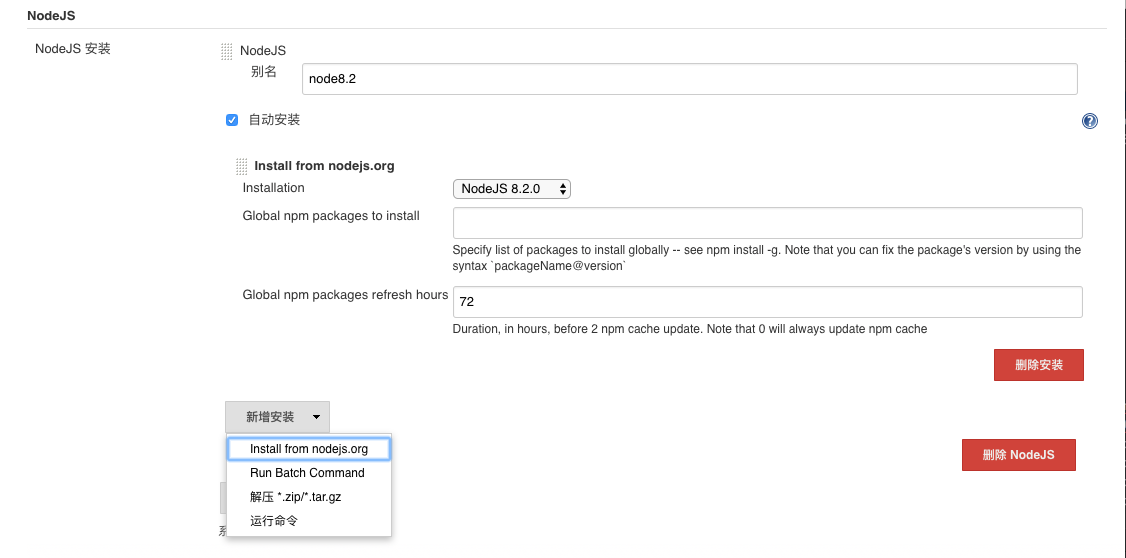 152015_VOwK_871390.png
指定特定版本 当然可选运行安装【奈何国内网络太慢】
152015_VOwK_871390.png
指定特定版本 当然可选运行安装【奈何国内网络太慢】
 152049_fkHn_871390.png
-
使用tnvm方案【淘宝https://github.com/aliyun-node/tnvm】
Taobao Node Version Manager
Installation
wget -O- https://raw.githubusercontent.com/aliyun-node/tnvm/master/install.sh | bash使用curl(Mac 已内置)
bash -c "$(curl -fsSL https://raw.githubusercontent.com/aliyun-node/tnvm/master/install.sh)"PS: 内网环境或者代理环境可在执行上述命令前增加执行, 使用wget获取文件
export METHOD=script手动source rc文件或重新打开sh,即可启动。
如果遇到 ssl 证书问题, 尝试
wget加上选项--no-check-certificateUsage
Support
alinode,node,iojs,node-profilerversion managertnvm lookup查看alinode基于node的版本, 便于替换相应版本。Example install alinode:
- tnvm ls-remote alinode
- tnvm lookup
- tnvm install alinode-v1.0.1
- tnvm use alinode-v1.0.1
Example install node:
- tnvm install node-v4.2.1
- tnvm use node-v4.2.1
Example install node-profiler:
- tnvm install profiler-v0.12.6
- tnvm use profiler-v0.12.6
More:
- refer to
tnvm help
Note:
- to remove, delete, or uninstall tnvm - just remove ~/.tnvm folders
-
我们在使用是直接用shell command即可
        source /root/.bashrc
        tnvm install node-v8.1.0
        tnvm use node-v8.1.0
        cnpm run build


网友评论